Diabetes Wellness &
Support for Members
Find everything you need for your diabetes-related benefits — all in one place.
Find everything you need for your diabetes-related benefits — all in one place.
Find everything you need for your diabetes-related benefits — all in one place.
Choose a topic below to learn how to check your coverage, request approval, or understand your claim options.
Before you make a purchase or submit a claim, check what your plan covers for diabetes‑related care. Your coverage applies when you use a Medavie Blue Cross-approved provider, which you can find in our app or online search tool.
If it's covered, you'll see the message Drug is a benefit
Your plan* may cover:
Depending on your plan, diabetes supplies may be covered under Extended Health Benefits rather than Drugs.
Your plan* may cover:
If the item isn't covered, you can still log in to your account to see what other options your plan includes. Some members may have a Health Spending Account (HSA) or Personal Wellness Account (PWA) that can help with the cost.
*Coverage varies by plan. Always refer to your benefits booklet for details.
Coverage for GLP-1 medications depends on your plan. When you log in to your account, check Drugs under your Coverage to see which medications are covered.
GLP-1 medications can be used to support diabetes treatment or weight management. Some examples include:
Coverage requirements may vary by plan. In some cases, your plan may require prior authorization. Your doctor can help you understand what’s needed for your situation. You can learn more about how to request prior authorization for diabetes below.
Find prior authorization request forms
Search for GLP-1 medications
Coverage for diabetic supplies, such as test strips, will vary based on your plan and the type of diabetes treatment you use.
If your plan has quantity limits, they are generally based on:
If you need more test strips than your plan covers, you can download the Blood Glucose Testing Supplies Request Form here.
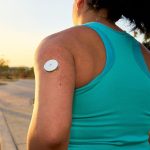
Sensors are covered when you use insulin because their coverage is based on diabetes treatment. If you don’t use insulin, regular blood glucose testing is usually enough for day-to-day diabetes management.
To check if your plan covers sensors, log in and go to Coverage to review your benefits.
If another insurer pays for your insulin, your pharmacist can send us confirmation by emailing [email protected] so we can update your file and review your sensor coverage. For more details, see the FAQ below.
If your insulin is covered by another payer, we may not see it in your file. Without that history, your plan may not show coverage for sensors.
However, you can still claim your sensors by following these steps:
Please note this does not guarantee coverage. Learn how coordination of benefits works when another payer is involved.
Insulin pumps require pre‑approval.
To get pre-approval, you’ll need:
To see your coverage for insulin pumps, log in to your account and:
Prior authorization (also called special authorization) is a pre-approval you need before certain medications are covered. It helps confirm that a prescription drug is covered under your plan before you buy it.
You can check by searching the drug name or Drug Identification Number (DIN) while logged into your account. You may see one of the following messages:
Special Authorization is required
This means you need pre-approval before the drug can be covered.
Preference or step therapy product available
This means we didn't find a medication in your history that meets the automatic approval criteria. You can still submit your information or a prior authorization form if you have already tried the preferred or step-therapy medication.
1. Review the criteria for your diabetes medication with your doctor or pharmacist.
2. Fill out the request form* together — you and your health professional can complete and submit it.
3. We'll review your request, confirm your approval if you meet the criteria, and help you get ready for treatment.
*Prior authorization forms apply to private health plans only.
You can find your specific claiming requirements for your diabetes-related benefits under Coverage in the Blue Cross Mobile app or the Member Services Site, or in your benefits booklet.
You’ll always need your receipt.
You may also need extra documents for claiming items such as glucose monitoring systems, testing supplies, or insulin pumps. Check your Coverage in the app for full details on what you need.
Once you have everything you need, log in to your account to submit your claim. You can also submit a claim form by mail.
For faster payment, sign up for direct deposit.
Some claims take longer to review and process, so wait times can vary by claim type. You can track your claim anytime by logging in to your account.
We’ll email you when your claim is complete, and you’ll get a push notification in the app if you have them turned on.
To submit a claim for an insulin pump, you'll need:
If provincial healthcare is helping to cover costs, please include a statement showing how much they cover.
To submit a claim for an insulin pump, log in to your account.
To submit a claim for orthopedic shoes, you'll need:
To submit a claim for orthopedic shoes, log in to your account.
Rental and purchase claims follow different steps. To submit a claim for medical equipment, log in to your account.
Rental
For most rental claims, you only need:
If you need the equipment for a long time or permanently, we may approve a purchase instead.
Purchase
You'll need pre-approval before you buy medical equipment. To get pre-approved, you'll need two quotes from different providers. Each quote must include:
If Medavie Blue Cross is not your primary health insurer, we need confirmation of what your primary insurer has approved.
If provincial healthcare covers part of the cost, we’ll need a statement that confirms the amount.
To submit a claim for purchase after you're pre-approved, you will need:
Managing your health is about more than coverage. Medavie Blue Cross offers support programs, health coaching, and blogs to maintain healthy habits and support your overall well-being.
The living well hub offers articles and tips on maintaining healthy habits no matter where you are in your health journey.
Explore these additional resources for support managing your health.
We're here to help. Contact us and we’ll guide you to the right next step.
We're here to help. Contact us and we’ll guide you to the right next step.